 Trustpilot



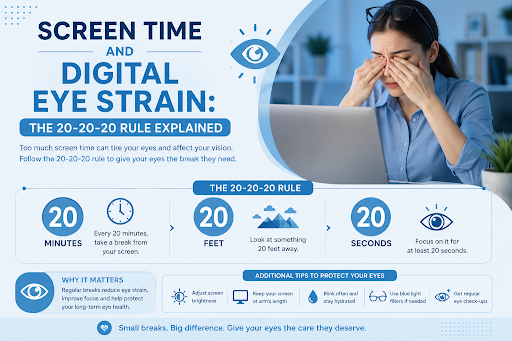
Whether you’re working on a computer, attending online classes, scrolling through your smartphone, or binge-watching your favourite TV series, screens have become an essential part of daily life. While digital devices offer convenience and productivity, prolonged screen use can place significant stress on your eyes, leading to a condition known as Digital Eye Strain, also called Computer Vision Syndrome (CVS).
Studies suggest that more than half of people who use digital devices for extended periods experience symptoms of digital eye strain. Fortunately, simple habits such as following the 20-20-20 rule, adjusting your workstation, and taking regular breaks can help reduce discomfort and protect your vision.
In this guide, we’ll explain what digital eye strain is, why it happens, common symptoms, and how the 20-20-20 rule can help keep your eyes comfortable and healthy.
What Is Digital Eye Strain?
Digital Eye Strain (DES), also known as Computer Vision Syndrome, refers to a group of eye and vision problems caused by prolonged use of digital screens.
These may include:
- Desktop computers
- Laptops
- Smartphones
- Tablets
- E-readers
- Television screens
Unlike printed text, digital screens often require your eyes to work harder because of glare, pixelation, contrast, and constant focusing.
Why Does Screen Time Cause Eye Strain?
Several factors contribute to digital eye strain.
Reduced Blinking
Normally, we blink around 15–20 times per minute. However, when focusing on a screen, this can decrease by almost half.
Reduced blinking causes:
- Dry eyes
- Burning sensation
- Irritation
- Blurred vision
Continuous Focusing
Your eye muscles constantly adjust focus when viewing digital text, especially if you’re switching between different windows or devices.
This continuous effort can lead to muscle fatigue.
Screen Glare
Reflections from overhead lighting, windows, or glossy screens make your eyes work harder to maintain focus.
Poor Posture
Improper workstation ergonomics may contribute to:
- Neck pain
- Shoulder pain
- Back discomfort
- Headaches
These symptoms often occur alongside eye strain.
Blue Light Exposure
Digital screens emit blue light.
Although current evidence suggests that blue light from screens is unlikely to cause permanent eye damage, prolonged exposure—particularly in the evening—may interfere with your body’s natural sleep cycle by suppressing melatonin production.
Common Symptoms of Digital Eye Strain
Symptoms may include:
- Tired eyes
- Eye fatigue
- Dry eyes
- Burning or stinging eyes
- Blurred vision
- Double vision
- Difficulty focusing
- Headaches
- Sensitivity to light
- Neck and shoulder pain
- Watery eyes
Symptoms often worsen after several hours of uninterrupted screen use.
What Is the 20-20-20 Rule?
The 20-20-20 rule is one of the simplest and most effective ways to reduce digital eye strain.
The rule is easy to remember:
- Every 20 minutes
- Look at something 20 feet (6 metres) away
- For at least 20 seconds
This short break allows the focusing muscles inside your eyes to relax, reducing fatigue and improving comfort.
Why Does the 20-20-20 Rule Work?
When you focus on a nearby screen for long periods, the tiny muscles inside your eyes remain continuously contracted.
Looking into the distance relaxes these muscles, giving your eyes a brief opportunity to recover.
The benefits include:
- Reduced eye fatigue
- Less muscle strain
- Improved blinking
- Better tear distribution
- Lower risk of dry eye symptoms
- Improved comfort during long workdays
Additional Tips to Reduce Digital Eye Strain
Blink More Often
Make a conscious effort to blink fully while using digital devices.
Complete blinking helps:
- Spread tears evenly
- Prevent dryness
- Maintain clear vision
Adjust Screen Position
Your monitor should be:
- About an arm’s length away (50–70 cm)
- Slightly below eye level
- Directly in front of you
This position reduces strain on both your eyes and neck.
Reduce Screen Glare
Minimise reflections by:
- Using anti-glare screen filters
- Closing blinds near windows
- Adjusting room lighting
- Positioning screens away from direct sunlight
Optimise Screen Brightness
Your screen should not be significantly brighter or darker than the surrounding room.
Adjust:
- Brightness
- Contrast
- Font size
- Display settings
for comfortable viewing.
Keep Your Eyes Lubricated
If you experience dry eyes:
- Blink regularly
- Use preservative-free artificial tears if recommended by your eye doctor
- Stay well hydrated
Follow Good Ergonomics
Maintain good posture by:
- Sitting with your feet flat on the floor
- Supporting your lower back
- Keeping shoulders relaxed
- Using an adjustable chair if possible
Are Children at Risk of Digital Eye Strain?
Yes.
Children are spending increasing amounts of time on:
- Tablets
- Smartphones
- Online learning platforms
- Gaming consoles
Excessive screen use may contribute to:
- Eye fatigue
- Dry eyes
- Reduced outdoor activity
- Increased risk of myopia (short-sightedness) progression
Parents should encourage regular breaks, outdoor play, and age-appropriate screen time.
Can Blue Light Glasses Help?
Blue light-filtering glasses have become increasingly popular.
Current research suggests:
- They may improve comfort for some individuals by reducing glare or improving contrast.
- There is limited evidence that they significantly reduce digital eye strain.
- They do not replace good screen habits or regular breaks.
If you have ongoing symptoms, a comprehensive eye examination is more beneficial than relying solely on blue light glasses.
When Should You See an Eye Doctor?
Arrange an eye examination if you experience:
- Persistent blurred vision
- Frequent headaches
- Double vision
- Eye pain
- Ongoing dry eyes
- Difficulty focusing
- Symptoms that do not improve with regular breaks
An ophthalmologist or optometrist can assess whether an underlying eye condition or an outdated prescription for glasses prescription is contributing to your symptoms.
Frequently Asked Questions
Does staring at screens permanently damage your eyes?
Current evidence indicates that normal use of digital screens does not cause permanent eye damage. However, prolonged screen time can lead to temporary discomfort and digital eye strain.
How often should I follow the 20-20-20 rule?
Ideally, every 20 minutes during prolonged screen use.
Setting reminders on your phone or computer can help you build the habit.
Can digital eye strain cause headaches?
Yes. Eye fatigue and prolonged focusing can contribute to headaches, particularly after extended computer use.
Are blue light glasses necessary?
Not for everyone. While some people find them comfortable, regular breaks, proper ergonomics, and correcting any vision problems have stronger evidence for reducing digital eye strain.
Tips for Healthier Screen Use
To protect your eyes during screen time:
- Follow the 20-20-20 rule every 20 minutes.
- Blink frequently to prevent dry eyes.
- Position your screen at the correct distance and height.
- Reduce glare from lighting and windows.
- Adjust brightness and font size for comfort.
- Stay hydrated and maintain good posture.
- Schedule regular comprehensive eye examinations.
Conclusion
Digital devices are an unavoidable part of modern life, but long hours in front of screens don’t have to come at the expense of your eye health. Digital eye strain is common and usually temporary, but symptoms such as dry eyes, blurred vision, headaches, and fatigue can affect productivity and quality of life.
Simple habits—particularly following the 20-20-20 rule, blinking more often, improving your workstation setup, and taking regular breaks—can significantly reduce discomfort. If your symptoms persist despite these measures, a comprehensive eye examination can help identify any underlying vision problems and ensure your eyes remain healthy for years to come.

